TI中文支持网
void PLLset(Uint16 val)
{
volatile Uint16 iVol;
// Make sure the PLL is not running in limp mode
if (SysCtrlRegs.PLLSTS.bit.MCLKSTS != 0)
{
// Missing external clock has been detected
// Replace this line with a call to an appropriate
// SystemShutdown(); function.
asm(" ESTOP0");
}
// CLKINDIV MUST be 0 before PLLCR can be changed from
// 0x0000. It is set to 0 by an external reset XRSn
// Change the PLLCR
if (SysCtrlRegs.PLLCR.bit.DIV != val)
{
EALLOW;
// Before setting PLLCR turn off missing clock detect logic
SysCtrlRegs.PLLSTS.bit.MCLKOFF = 1;
SysCtrlRegs.PLLCR.bit.DIV = val;
EDIS;
// Optional: Wait for PLL to lock.
// During this time the CPU will switch to OSCCLK/2 until
// the PLL is stable. Once the PLL is stable the CPU will
// switch to the new PLL value.
//
// This time-to-lock is monitored by a PLL lock counter.
//
// Code is not required to sit and wait for the PLL to lock.
// However, if the code does anything that is timing critical,
// and requires the correct clock be locked, then it is best to
// wait until this switching has completed.
// Wait for the PLL lock bit to be set.
// The watchdog should be disabled before this loop, or fed within
// the loop via ServiceDog().
// Uncomment to disable the watchdog
WDogDisable();
EALLOW;
SysCtrlRegs.PLLSTS.bit.MCLKOFF = 0;
// SysCtrlRegs.PLLSTS.bit.CLKINDIV != clkindiv;
EDIS;
}
}
以上为controlSuite里面的一个时钟设置函数,我之前看到过一个在一个例程里面看到设置函数是这样的
void InitPll(Uint16 val, Uint16 divsel)
{
// Make sure the PLL is not running in limp mode
if (SysCtrlRegs.PLLSTS.bit.MCLKSTS != 0)
{
// Missing external clock has been detected
// Replace this line with a call to an appropriate
// SystemShutdown(); function.
asm(" ESTOP0");
}
// DIVSEL MUST be 0 before PLLCR can be changed from
// 0x0000. It is set to 0 by an external reset XRSn
// This puts us in 1/4
if (SysCtrlRegs.PLLSTS.bit.DIVSEL != 0)
{
EALLOW;
SysCtrlRegs.PLLSTS.bit.DIVSEL = 0;
EDIS;
}
// Change the PLLCR
if (SysCtrlRegs.PLLCR.bit.DIV != val)
{
EALLOW;
// Before setting PLLCR turn off missing clock detect logic
SysCtrlRegs.PLLSTS.bit.MCLKOFF = 1;
SysCtrlRegs.PLLCR.bit.DIV = val;
EDIS;
// Optional: Wait for PLL to lock.
// During this time the CPU will switch to OSCCLK/2 until
// the PLL is stable. Once the PLL is stable the CPU will
// switch to the new PLL value.
//
// This time-to-lock is monitored by a PLL lock counter.
//
// Code is not required to sit and wait for the PLL to lock.
// However, if the code does anything that is timing critical,
// and requires the correct clock be locked, then it is best to
// wait until this switching has completed.
// Wait for the PLL lock bit to be set.
// The watchdog should be disabled before this loop, or fed within
// the loop via ServiceDog().
// Uncomment to disable the watchdog
DisableDog();
while(SysCtrlRegs.PLLSTS.bit.PLLLOCKS != 1)
{
// Uncomment to service the watchdog
// ServiceDog();
}
EALLOW;
SysCtrlRegs.PLLSTS.bit.MCLKOFF = 0;
EDIS;
}
// If switching to 1/2
if((divsel == 1)||(divsel == 2))
{
EALLOW;
SysCtrlRegs.PLLSTS.bit.DIVSEL = divsel;
EDIS;
}
// If switching to 1/1
// * First go to 1/2 and let the power settle
// The time required will depend on the system, this is only an example
// * Then switch to 1/1
if(divsel == 3)
{
EALLOW;
SysCtrlRegs.PLLSTS.bit.DIVSEL = 2;
DELAY_US(50L);
SysCtrlRegs.PLLSTS.bit.DIVSEL = 3;
EDIS;
}
}
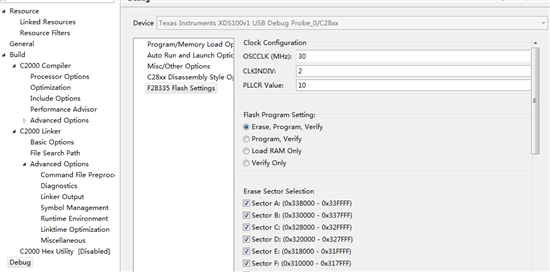
我查阅手册,发现第二种写法是不是更正确一下,在第一种函数里面Divsel根本没设置,这样出的时钟频率在加入30MHz晶振之后不应该是300M吗?ControlSuite怎么会给出这样一个代码呢?
mangui zhang:
系统时钟 应该是10倍频 然后进行分频吧
比如2分频 为150M
void PLLset(Uint16 val)
{
volatile Uint16 iVol;
// Make sure the PLL is not running in limp mode
if (SysCtrlRegs.PLLSTS.bit.MCLKSTS != 0)
{
// Missing external clock has been detected
// Replace this line with a call to an appropriate
// SystemShutdown(); function.
asm(" ESTOP0");
}
// CLKINDIV MUST be 0 before PLLCR can be changed from
// 0x0000. It is set to 0 by an external reset XRSn
// Change the PLLCR
if (SysCtrlRegs.PLLCR.bit.DIV != val)
{
EALLOW;
// Before setting PLLCR turn off missing clock detect logic
SysCtrlRegs.PLLSTS.bit.MCLKOFF = 1;
SysCtrlRegs.PLLCR.bit.DIV = val;
EDIS;
// Optional: Wait for PLL to lock.
// During this time the CPU will switch to OSCCLK/2 until
// the PLL is stable. Once the PLL is stable the CPU will
// switch to the new PLL value.
//
// This time-to-lock is monitored by a PLL lock counter.
//
// Code is not required to sit and wait for the PLL to lock.
// However, if the code does anything that is timing critical,
// and requires the correct clock be locked, then it is best to
// wait until this switching has completed.
// Wait for the PLL lock bit to be set.
// The watchdog should be disabled before this loop, or fed within
// the loop via ServiceDog().
// Uncomment to disable the watchdog
WDogDisable();
EALLOW;
SysCtrlRegs.PLLSTS.bit.MCLKOFF = 0;
// SysCtrlRegs.PLLSTS.bit.CLKINDIV != clkindiv;
EDIS;
}
}
以上为controlSuite里面的一个时钟设置函数,我之前看到过一个在一个例程里面看到设置函数是这样的
void InitPll(Uint16 val, Uint16 divsel)
{
// Make sure the PLL is not running in limp mode
if (SysCtrlRegs.PLLSTS.bit.MCLKSTS != 0)
{
// Missing external clock has been detected
// Replace this line with a call to an appropriate
// SystemShutdown(); function.
asm(" ESTOP0");
}
// DIVSEL MUST be 0 before PLLCR can be changed from
// 0x0000. It is set to 0 by an external reset XRSn
// This puts us in 1/4
if (SysCtrlRegs.PLLSTS.bit.DIVSEL != 0)
{
EALLOW;
SysCtrlRegs.PLLSTS.bit.DIVSEL = 0;
EDIS;
}
// Change the PLLCR
if (SysCtrlRegs.PLLCR.bit.DIV != val)
{
EALLOW;
// Before setting PLLCR turn off missing clock detect logic
SysCtrlRegs.PLLSTS.bit.MCLKOFF = 1;
SysCtrlRegs.PLLCR.bit.DIV = val;
EDIS;
// Optional: Wait for PLL to lock.
// During this time the CPU will switch to OSCCLK/2 until
// the PLL is stable. Once the PLL is stable the CPU will
// switch to the new PLL value.
//
// This time-to-lock is monitored by a PLL lock counter.
//
// Code is not required to sit and wait for the PLL to lock.
// However, if the code does anything that is timing critical,
// and requires the correct clock be locked, then it is best to
// wait until this switching has completed.
// Wait for the PLL lock bit to be set.
// The watchdog should be disabled before this loop, or fed within
// the loop via ServiceDog().
// Uncomment to disable the watchdog
DisableDog();
while(SysCtrlRegs.PLLSTS.bit.PLLLOCKS != 1)
{
// Uncomment to service the watchdog
// ServiceDog();
}
EALLOW;
SysCtrlRegs.PLLSTS.bit.MCLKOFF = 0;
EDIS;
}
// If switching to 1/2
if((divsel == 1)||(divsel == 2))
{
EALLOW;
SysCtrlRegs.PLLSTS.bit.DIVSEL = divsel;
EDIS;
}
// If switching to 1/1
// * First go to 1/2 and let the power settle
// The time required will depend on the system, this is only an example
// * Then switch to 1/1
if(divsel == 3)
{
EALLOW;
SysCtrlRegs.PLLSTS.bit.DIVSEL = 2;
DELAY_US(50L);
SysCtrlRegs.PLLSTS.bit.DIVSEL = 3;
EDIS;
}
}
我查阅手册,发现第二种写法是不是更正确一下,在第一种函数里面Divsel根本没设置,这样出的时钟频率在加入30MHz晶振之后不应该是300M吗?ControlSuite怎么会给出这样一个代码呢?
chuang hou:
回复 mangui zhang:
我的意思就是controlSuite里面没分频。。。
void PLLset(Uint16 val)
{
volatile Uint16 iVol;
// Make sure the PLL is not running in limp mode
if (SysCtrlRegs.PLLSTS.bit.MCLKSTS != 0)
{
// Missing external clock has been detected
// Replace this line with a call to an appropriate
// SystemShutdown(); function.
asm(" ESTOP0");
}
// CLKINDIV MUST be 0 before PLLCR can be changed from
// 0x0000. It is set to 0 by an external reset XRSn
// Change the PLLCR
if (SysCtrlRegs.PLLCR.bit.DIV != val)
{
EALLOW;
// Before setting PLLCR turn off missing clock detect logic
SysCtrlRegs.PLLSTS.bit.MCLKOFF = 1;
SysCtrlRegs.PLLCR.bit.DIV = val;
EDIS;
// Optional: Wait for PLL to lock.
// During this time the CPU will switch to OSCCLK/2 until
// the PLL is stable. Once the PLL is stable the CPU will
// switch to the new PLL value.
//
// This time-to-lock is monitored by a PLL lock counter.
//
// Code is not required to sit and wait for the PLL to lock.
// However, if the code does anything that is timing critical,
// and requires the correct clock be locked, then it is best to
// wait until this switching has completed.
// Wait for the PLL lock bit to be set.
// The watchdog should be disabled before this loop, or fed within
// the loop via ServiceDog().
// Uncomment to disable the watchdog
WDogDisable();
EALLOW;
SysCtrlRegs.PLLSTS.bit.MCLKOFF = 0;
// SysCtrlRegs.PLLSTS.bit.CLKINDIV != clkindiv;
EDIS;
}
}
以上为controlSuite里面的一个时钟设置函数,我之前看到过一个在一个例程里面看到设置函数是这样的
void InitPll(Uint16 val, Uint16 divsel)
{
// Make sure the PLL is not running in limp mode
if (SysCtrlRegs.PLLSTS.bit.MCLKSTS != 0)
{
// Missing external clock has been detected
// Replace this line with a call to an appropriate
// SystemShutdown(); function.
asm(" ESTOP0");
}
// DIVSEL MUST be 0 before PLLCR can be changed from
// 0x0000. It is set to 0 by an external reset XRSn
// This puts us in 1/4
if (SysCtrlRegs.PLLSTS.bit.DIVSEL != 0)
{
EALLOW;
SysCtrlRegs.PLLSTS.bit.DIVSEL = 0;
EDIS;
}
// Change the PLLCR
if (SysCtrlRegs.PLLCR.bit.DIV != val)
{
EALLOW;
// Before setting PLLCR turn off missing clock detect logic
SysCtrlRegs.PLLSTS.bit.MCLKOFF = 1;
SysCtrlRegs.PLLCR.bit.DIV = val;
EDIS;
// Optional: Wait for PLL to lock.
// During this time the CPU will switch to OSCCLK/2 until
// the PLL is stable. Once the PLL is stable the CPU will
// switch to the new PLL value.
//
// This time-to-lock is monitored by a PLL lock counter.
//
// Code is not required to sit and wait for the PLL to lock.
// However, if the code does anything that is timing critical,
// and requires the correct clock be locked, then it is best to
// wait until this switching has completed.
// Wait for the PLL lock bit to be set.
// The watchdog should be disabled before this loop, or fed within
// the loop via ServiceDog().
// Uncomment to disable the watchdog
DisableDog();
while(SysCtrlRegs.PLLSTS.bit.PLLLOCKS != 1)
{
// Uncomment to service the watchdog
// ServiceDog();
}
EALLOW;
SysCtrlRegs.PLLSTS.bit.MCLKOFF = 0;
EDIS;
}
// If switching to 1/2
if((divsel == 1)||(divsel == 2))
{
EALLOW;
SysCtrlRegs.PLLSTS.bit.DIVSEL = divsel;
EDIS;
}
// If switching to 1/1
// * First go to 1/2 and let the power settle
// The time required will depend on the system, this is only an example
// * Then switch to 1/1
if(divsel == 3)
{
EALLOW;
SysCtrlRegs.PLLSTS.bit.DIVSEL = 2;
DELAY_US(50L);
SysCtrlRegs.PLLSTS.bit.DIVSEL = 3;
EDIS;
}
}
我查阅手册,发现第二种写法是不是更正确一下,在第一种函数里面Divsel根本没设置,这样出的时钟频率在加入30MHz晶振之后不应该是300M吗?ControlSuite怎么会给出这样一个代码呢?
cumt wuxiang:
问题解决了吗?